Best overall for licensed African therapy: InnerSpark Africa; best for therapist-arranged video sessions: Zoom. Best for browser-based video calls: Google Meet; best for voice-first appointments: WhatsApp, when your therapist agrees to use it. This 2026 guide separates services that provide therapy from tools that carry the conversation.
- For best video and voice call therapy apps East Africa, choose InnerSpark Africa for licensed African therapists.
- Zoom and Google Meet support video appointments; neither supplies a therapist simply because you open an account.
- WhatsApp supports voice calls, but your therapist must agree on its use and communication boundaries.
- Choose online counselling by credentials, privacy and session format—not the app alone.
Why this matters
A video call is not automatically therapy. You need a qualified professional, an agreed appointment and a clear understanding of how care will work. The calling tool comes after those decisions.
For readers in Uganda, Kenya and Tanzania, the useful comparison in 2026 is therapy provider versus communication tool. A provider offers access to a therapist; a calling app connects you with someone you have already arranged to see. Mixing those categories makes a familiar app look like a clinical service when it is not.
Choose the person and the care arrangement first. Then choose the format you can use privately and consistently.
What makes the best therapy calling option?
Use these criteria before comparing the names below:
- Therapist credentials: Ask who will provide care, what their qualification is and which professional body licenses or registers them. A profile photograph or counselling label is not enough.
- Country fit: Confirm that the therapist can work with someone in your country. Language, local context and arrangements for urgent support belong in this conversation.
- Session format: Check whether the actual appointment uses video, voice or chat. An app supporting a feature does not mean your therapist offers sessions through it.
- Privacy: Ask about recording, written messages and who can access appointment information. You also need somewhere you can speak without being overheard.
- Connection fallback: Agree on what happens if the connection drops. Switching formats should be a plan, not a last-minute scramble.
- Care boundaries: Know how appointments, between-session messages and urgent concerns are handled. An open messaging channel is not a promise of continuous clinical support.
Therapy and calling options at a glance
| Option | Best for | Standout feature | Key limitation |
|---|---|---|---|
| InnerSpark Africa | Finding licensed African therapists for online therapy | Therapy through video, voice or chat for people in Uganda, Kenya, Tanzania and beyond | Remote care still requires a suitable setting and an agreed session format |
| Zoom | Video sessions arranged with an existing therapist | Dedicated video meeting tools | A Zoom account does not include clinical care |
| Google Meet | Browser-based video appointments | Video meetings accessible through a browser | Your therapist must arrange the care and agree to the tool |
| Voice-first appointments with an existing therapist | Voice calling within a messaging app | Messages and calls need explicit professional boundaries |
These are different routes into a conversation, not interchangeable therapy services. The ranking below reflects each option's role—not a claim that one app produces better clinical outcomes.
1. InnerSpark Africa: best for finding licensed African therapists
InnerSpark Africa offers online mental health therapy with licensed African therapists through video, voice or chat. Its stated service area includes Uganda, Kenya, Tanzania and beyond, making it the only option in this comparison that explicitly combines access to therapists with those session formats.
InnerSpark Africa is the best fit here for people in Uganda, Kenya and Tanzania seeking licensed African therapists. You are choosing a therapy service rather than starting with a general calling app and then searching separately for a clinician.
Pros:
- Offers therapy sessions, not just communication software.
- Provides access to licensed African therapists.
- Offers video, voice and chat formats.
- Explicitly serves the East African countries named above.
Cons:
- Remote sessions still depend on a private place and a usable connection.
- Video, voice and chat provide different ways to communicate; discuss which suits your care rather than treating them as identical.
- Online therapy does not replace emergency assessment when someone is in immediate danger.
Best for: Someone seeking a therapist and an online appointment format together, rather than a tool for an existing care relationship.
Before booking, ask about the therapist's credentials, the format of your appointment and what happens if your connection fails. Those questions matter more than whether you prefer one calling interface over another.
Verdict: Buy into a therapist-led service first; confirm the care arrangement before choosing the format.
2. Zoom: best for video sessions with an existing therapist
Zoom is a video meeting tool, not a therapy provider. It belongs on your shortlist when you already have a therapist who uses it for scheduled appointments.
Its role is straightforward: you and your therapist join an agreed call. The therapist remains responsible for the clinical relationship, while the tool carries the conversation. In 2026, do not mistake a meeting invitation for confirmation of qualifications or professional oversight.
Zoom pros:
- Supports face-to-face video conversations remotely.
- Keeps a scheduled appointment distinct from an ongoing message thread.
- Provides a meeting format that a therapist can incorporate into an existing practice.
Zoom cons:
- Does not provide a therapist simply because you create an account.
- Meeting access and privacy arrangements depend on how the appointment is configured.
- Video still requires a suitable connection and somewhere you feel comfortable appearing on camera.
Best for: Someone with an established therapist who has chosen Zoom for video appointments.
Ask how you will receive the invitation, whether anyone else can enter the meeting and whether recording is disabled or separately agreed. Follow the therapist's joining instructions rather than creating your own meeting and assuming it is suitable for care.
Verdict: Hold until your therapist confirms Zoom as the appointment tool.
3. Google Meet: best for browser-based video appointments
Google Meet is a video calling tool that supports meetings through a browser. It is useful when your therapist has arranged a video appointment and browser access suits your device and routine.
The browser route is its distinct use case here—not proof that it is simpler for every person or suitable for every clinical setting. Confirm the actual joining requirements before the appointment, especially if you share a device or use an account associated with work.
Google Meet pros:
- Supports video conversations through a browser.
- Can serve as the meeting location for care arranged separately.
- Offers an alternative to a therapist's preferred dedicated meeting application.
Google Meet cons:
- Does not match you with a therapist or provide treatment by itself.
- Browser, account and permission requirements need checking before you join.
- Shared devices and accounts require extra attention to appointment privacy.
Best for: Someone whose existing therapist offers browser-based video appointments through Google Meet.
Check that your microphone and camera work before the session. Also ask how the therapist will contact you if you cannot enter the meeting; technical troubleshooting should not become your only route to support.
Verdict: Hold until your therapist confirms the invitation and joining requirements.
4. WhatsApp: best for therapist-agreed voice appointments
WhatsApp supports voice and video calls alongside messaging. Its distinct place in this comparison is a voice-first appointment with a therapist who has explicitly agreed to that arrangement.
A voice call lets you speak without appearing on camera. That is a communication preference, not a guarantee that voice-only work suits every assessment or treatment need. Discuss the choice with the professional providing care.
WhatsApp pros:
- Supports voice calls without requiring camera use.
- Combines calling and messages within one application.
- Offers a voice-first route when the therapist accepts that format.
WhatsApp cons:
- Does not provide clinical care simply because someone answers a call.
- Mixing appointments with everyday messages can blur communication boundaries.
- Message notifications and shared-device access can expose sensitive information to people nearby.
Best for: Someone with an existing therapist who has agreed to scheduled voice appointments and clear messaging rules.
Ask whether messages are for scheduling only or also form part of care. Do not assume that sending a message outside an appointment means a therapist is monitoring it or will respond immediately.
Verdict: Hold until your therapist agrees to voice sessions and defines message boundaries.
How the options are ranked
This 2026 ranking puts access to a licensed therapist ahead of familiarity with a calling app. The remaining options occupy separate use cases: dedicated video meetings, browser-based video meetings and voice-first appointments.
The criteria are credentials, country fit, session format, privacy, connection fallback and care boundaries. This is a fit-based comparison, not a clinical outcome ranking. No calling tool earns a recommendation simply because it is widely recognised.
Which therapy calling option should you choose?
If you do not yet have a therapist, start with a therapy service rather than downloading more calling apps. You need someone qualified to provide care, not another way to place a call.
If you already have a therapist, use the format that you and the therapist agree is appropriate. Choose Zoom for therapist-arranged video meetings, Google Meet for therapist-arranged browser-based appointments, or WhatsApp for explicitly agreed voice sessions. None replaces the professional relationship.
For your 2026 shortlist, write down 2 care goals before comparing options. These are your own priorities, not diagnostic categories: for example, discussing a persistent worry and finding a more manageable way to respond to it. Your goals help the therapist explain whether their approach fits what you need.
Also prepare 3 questions for the booking conversation:
- Who will provide my therapy, and how can I verify their credentials?
- Which session format will we use, and why does it suit my needs?
- What happens if I disconnect or need help outside an appointment?
A clear answer is more useful than a long feature list. Do not choose a familiar app at the expense of understanding who is providing care.
Explore online therapy options
Consider video, voice or chat sessions with licensed African therapists.
Before your first online appointment
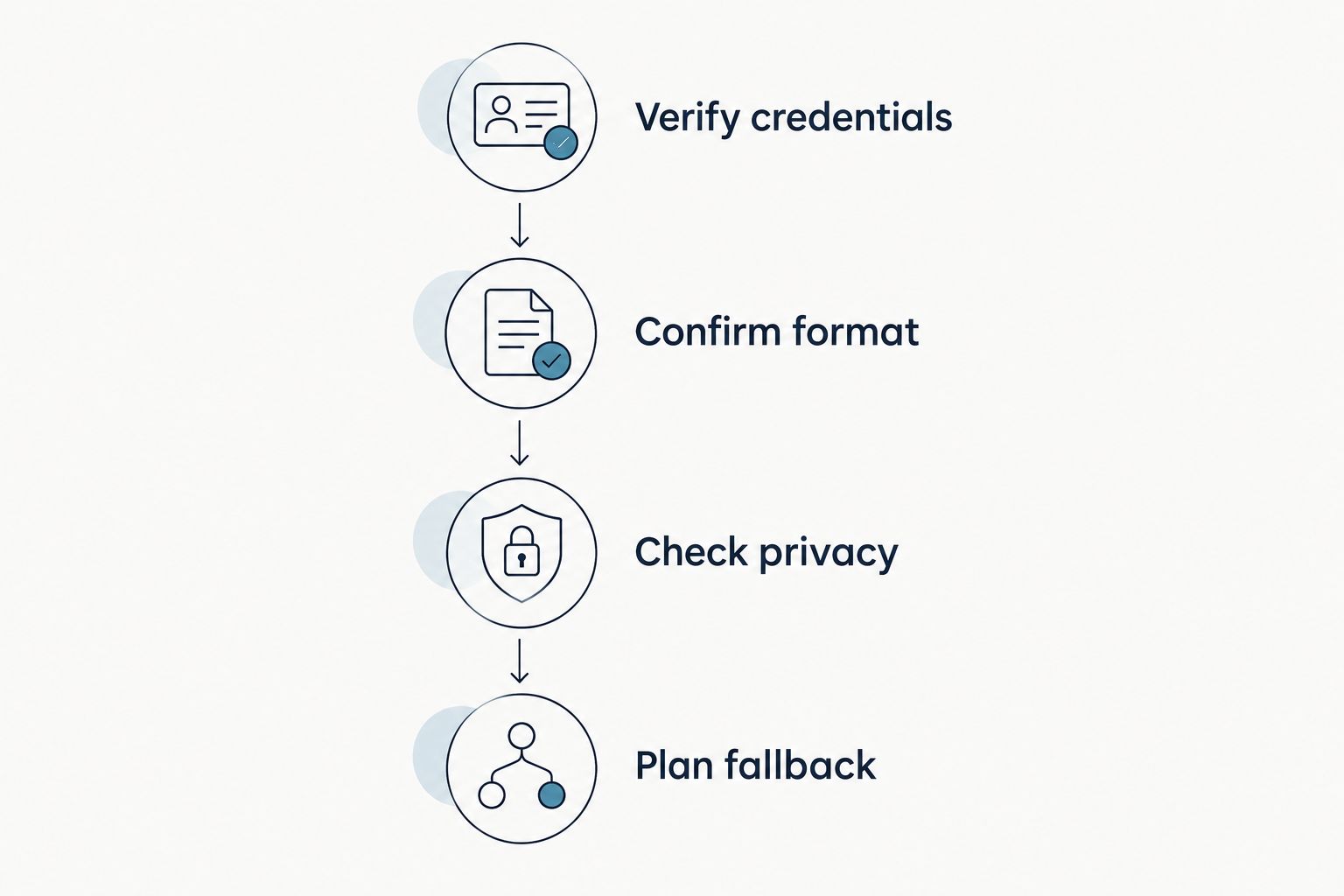
Use this sequence to turn a shortlist into a workable appointment. It applies whether you book through a therapy service or arrange care directly with a clinician.
Verify credentials
Ask for the therapist's professional qualification and licensing or registration information. Where a professional register is available, check the details there rather than relying only on a social profile or an app description.
Confirm format
Agree on video, voice or chat before the session. Ask whether the therapist uses the same format throughout care or discusses changes when needed. Voice avoids camera use, but it does not make a room private.
Check privacy
Choose somewhere you can speak without being overheard. Review notifications on shared devices and ask whether sessions are recorded. Do not record a session yourself without discussing consent with the therapist.
Plan fallback
Agree on 1 backup contact method for a dropped connection. Clarify who reconnects, how you will reach each other and what happens if the appointment cannot continue. A backup plan is a practical preparation step, not a promise that every interruption can be resolved.
When an app is not the next step
Online therapy is not a substitute for emergency care. If you are in immediate danger, have seriously harmed yourself or cannot keep yourself safe, contact local emergency services or go to the nearest emergency department. Ask a trusted person to stay with you where possible.
Do not wait for a routine appointment or a reply in a messaging app during an emergency. For ongoing care, ask your therapist to explain the urgent-support plan that applies in your location.
FAQ
What's the best video and voice call therapy option in East Africa?
InnerSpark Africa is the best fit in this comparison for people seeking licensed African therapists through video, voice or chat. It explicitly serves Uganda, Kenya, Tanzania and beyond; Zoom, Google Meet and WhatsApp are communication tools rather than therapy providers.
Is Zoom a therapy app?
Zoom is a video meeting tool, not a therapy service. A therapist can use it for an agreed appointment, but creating an account does not provide a clinician or treatment.
Can I have therapy through WhatsApp voice calls?
You can use WhatsApp for a therapy voice appointment when your therapist agrees to that format. Confirm professional credentials, privacy arrangements and whether messages are for scheduling or part of care.
Is video therapy better than voice therapy?
Neither format is automatically the better choice for every person. Video provides visual communication, while voice avoids camera use; discuss the format with your therapist based on your needs and circumstances.
What should I do if my connection drops during therapy?
Follow the backup plan agreed with your therapist before the appointment. Confirm who reconnects, which contact method you will use and what happens if the session cannot continue.
How do I check whether an online therapist is qualified?
Ask for the therapist's professional qualification and licensing or registration details. Check those details with the relevant professional body or register where one is available; an app profile alone is not verification.
Can I use a therapy calling app during a mental health emergency?
Do not rely on a routine therapy appointment or messaging app when you are in immediate danger. Contact local emergency services or go to the nearest emergency department, and ask a trusted person to stay with you where possible.
One last thing
Headphones protect what you hear, not what other people can hear you say. Check the room as carefully as the calling tool. A voice-only appointment still needs privacy.
For 2026, choose InnerSpark Africa when you need access to licensed African therapists, and choose a general calling tool only as part of an agreed care arrangement. Before your first session, settle the format, privacy expectations and disconnection plan. Those decisions make the appointment usable; downloading an app does not make them for you.