Instead of repeatedly searching for a therapy contact or sending sensitive messages to an unverified number, start an InnerSpark WhatsApp chat therapy inquiry through the official website, confirm whether WhatsApp is an approved channel, and agree on how your sessions will work. InnerSpark Africa offers chat-based therapy, but that does not establish a WhatsApp integration or a WhatsApp booking process.
- For innerspark whatsapp chat therapy, verify the contact and approved messaging channel before sharing personal information.
- InnerSpark Africa offers online therapy by video, voice, or chat with licensed African therapists.
- Confirm whether WhatsApp handles booking, therapy sessions, or neither; these are different uses.
- Agree on session timing, confidentiality, and a backup contact method before beginning chat-based counselling.
Why this matters
A messaging account is not proof that you have reached a therapy provider. Start with InnerSpark Africa, rather than a number copied from a forwarded message, social media comment, or unofficial listing.
InnerSpark Africa is best for people seeking online therapy with licensed African therapists by video, voice, or chat. The service serves individuals in Uganda, Kenya, Tanzania, and beyond. Your next step is to confirm the communication method for your own appointment, not to assume that every chat option uses WhatsApp.
For this 2026 guide, the distinction is simple: contacting a service, booking an appointment, and attending therapy are separate activities. A provider might approve a messaging channel for one activity without approving it for the others. Ask about each activity before sending a personal history.
Before you start
- Prepare official access. Have a browser, a working internet connection, and access to the phone number you intend to use. You need WhatsApp only if the provider confirms that your intended activity takes place there.
- Prepare a private setting. Choose somewhere you can read and type without someone watching. Set aside 5 minutes to check your device privacy before your first conversation; this is a preparation suggestion, not a booking-time promise.
- Check the hidden obstacle. A chat-based therapy service does not necessarily provide therapy through WhatsApp. Confirm the channel before installing anything, transferring records, or following setup instructions sent by an unfamiliar account.
Do not use routine therapy messaging as an emergency route. If you are in immediate danger or cannot keep yourself safe, contact local emergency services or go to the nearest emergency department. Do not wait for a booking or chat reply.
Official contact verification
Establish the correct route
- Open the official website using the link above. Use the contact or booking information actually displayed there; do not guess a phone number or substitute a search-result advertisement.
- Ask whether WhatsApp is an approved contact method. Specify whether you want to arrange an appointment, attend a text-based session, or send an administrative question.
- If you receive a number through another source, ask the service to verify it through its official contact route. A profile photograph or familiar display name does not establish who controls an account.
- Keep your first inquiry administrative. Explain that you want chat-based counselling and ask how to proceed, without attaching identification documents, medical records, or a detailed account of your concerns.
Expected result: You know which contact route the service recognizes and what you are allowed to use it for. If WhatsApp is not confirmed, continue through the provider's approved route instead.
For a 2026 appointment, use the contact details currently published by the service. An old saved conversation does not establish that a number still belongs to the same provider.
Separate contact from treatment
Ask these 3 questions before treating a message thread as a therapy session:
- Is this contact for appointment administration or for counselling itself?
- Who will read messages sent to this account?
- When does the agreed session begin, and when should I expect a reply?
These questions prevent an administrative conversation from becoming an unintended disclosure. You do not need to explain everything before you know who is receiving the message.
Session format and boundaries
Choose the communication format
- State whether you prefer text, voice, or video. Explain practical constraints, such as difficulty speaking privately or an internet connection that interrupts calls.
- Ask which format the therapist recommends for your situation. A preference for typing is useful information, but the clinical suitability of a format belongs in the discussion with the therapist.
- If WhatsApp is approved, establish whether the appointment is a scheduled live conversation or an exchange with replies at agreed times. Do not infer response expectations from the app's messaging features.
- Confirm the date, local time, time zone, and session length before the appointment. Put the agreed details in your calendar rather than relying on memory.
Expected result: You have an agreed format and appointment arrangement, not merely an open message thread.
| Format | Best for | Practical advantage | Limitation to discuss |
|---|---|---|---|
| Text chat | People who prefer to write or cannot speak privately | Lets you compose thoughts in writing | Tone and meaning can require clarification |
| Voice | People who prefer conversation without being on camera | Lets you speak without sharing video | Requires a place where speech cannot be overheard |
| Video | People who want visual conversation | Adds facial expressions to the discussion | Requires camera privacy and a connection suitable for video |
Choose the format you can use privately and consistently. No format removes the need to verify the contact, understand confidentiality, and agree on session boundaries.
Agree on confidentiality
Ask how messages are handled, whether anyone besides the therapist can access the conversation, and what records are retained. Also ask the therapist to explain the limits of confidentiality, including circumstances involving serious safety concerns or legal obligations.
Your 2026 setup should cover both clinical confidentiality and device privacy. A confidential service cannot prevent a person beside you from reading an unlocked screen. Likewise, a private phone does not explain the provider's record-handling practices; ask about both.
Device privacy and first-session preparation
Check your device
- Enable a screen lock on your phone and review whether other people know the unlocking code. If someone monitors or controls your device, discuss a safer contact method before changing settings that might draw attention.
- In WhatsApp, review Linked devices and log out devices you do not recognize or no longer use. Consider whether a shared computer could expose messages.
- Review Privacy and your phone's notification settings. Turn off message previews if visible notifications would disclose that you are seeking counselling. Exact settings and paths differ by operating system and app version.
- Review Two-step verification in WhatsApp's account settings. Never share registration codes or verification PINs with someone who claims they need them to arrange therapy.
- Check your chat-backup settings and the account that stores backups. Ask about record handling before deciding whether a messaging app fits your privacy needs.
Expected result: You have checked the obvious routes through which someone else could see or access your messages. These checks reduce exposure; they do not guarantee that a device is safe.
Prepare the first exchange
Write 1 sentence describing what you want help with, then add any communication preference the therapist should know. For example, explain that speaking aloud is difficult in your living situation, without sending a full personal history to an administrative contact.
Spend 2 minutes checking that your device is charged, your connection works, and your appointment details are accessible. This is a suggested check, not a service requirement or a promised connection time.
Send a test message only if the provider has asked you to do so. Avoid repeatedly sending sensitive material to see whether the account responds.
Session start and continuity
Begin through the approved channel
- Open the confirmed contact or approved session route at the agreed time. Check that you are using the correct conversation before sending personal information.
- Establish who is present and confirm that the therapy session has started. Ask for clarification if you are unsure whether you are speaking with a therapist or an administrative team member.
- Discuss the main concern you prepared, then let the therapist guide the conversation. Ask for clarification whenever a written response feels ambiguous.
- Before finishing, agree on the next contact, any follow-up task, and what to do if the connection fails during a future session.
Expected result: You have a defined start, a clear understanding of who is responding, and a plan for continuing care.
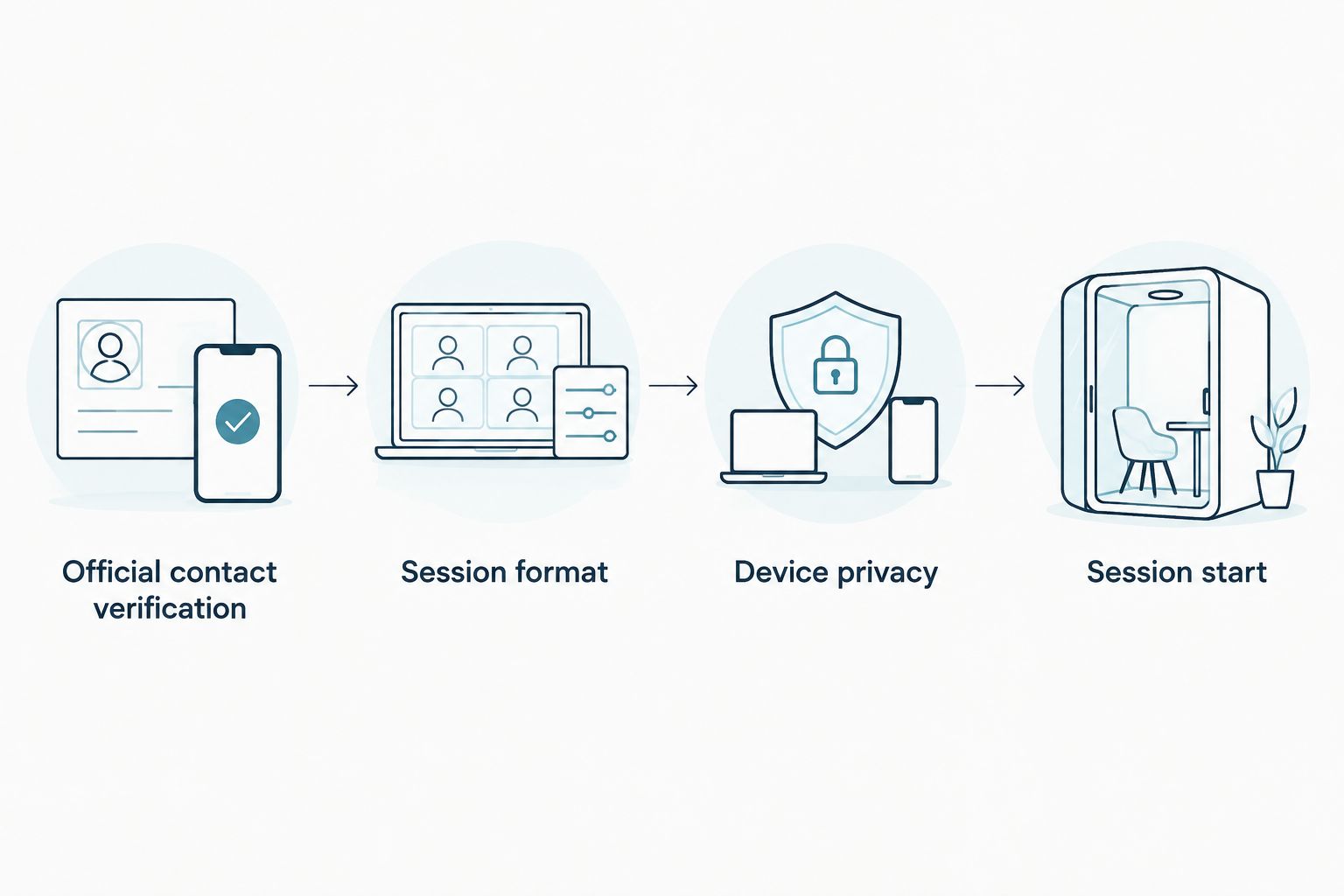
The sequence for a 2026 setup is verification first, agreed boundaries second, privacy checks third, and the appointment last. Connecting an account is not the same as beginning treatment.
Use messaging for booking, then attend elsewhere
A separate workflow applies when a provider approves WhatsApp for administration but uses another channel for therapy. This is a distinction to confirm, not a claim about the service's current setup.
Keep appointment questions in the administrative thread. Follow the provider's instructions for attending the session, and ask where clinical questions should go between appointments. Do not assume the booking contact is monitored by your therapist.
If you move from text to voice or video, confirm the change before the appointment. Ask whether the same therapist will attend, which route to use, and what happens if the connection drops. A change of format should not leave you guessing where to appear.
The benefit of this workflow is clear separation between logistics and treatment. The drawback is that you must keep track of more than one communication route. Record each route's purpose alongside your appointment details.
Troubleshooting
You cannot find a WhatsApp option
Return to the official contact information and ask which channel supports chat therapy. Do not install a third-party connector or follow instructions claiming to activate a therapy integration without confirmation from the provider.
The account asks for a verification code
Do not share the code. WhatsApp registration codes and verification PINs protect account access; they are not information you need to give another person to explain your therapy preference. Contact the provider through its official route to verify the request.
Your message has no reply
Check the agreed response arrangement and appointment time. A delivered message or read receipt does not establish that a clinical session has begun. Use the agreed follow-up route rather than repeatedly resending your personal history.
Notifications expose private messages
Disable message previews through your phone's notification controls and review access from linked devices. If someone else controls the device, prioritize a safer contact arrangement rather than assuming a settings change solves the problem.
The connection fails during therapy
Follow the backup plan agreed with the therapist. If there is no plan, use the verified administrative route to ask how to reconnect or rearrange the appointment. Do not move to an unfamiliar number sent by an unverified account.
Customize your workflow
Build a repeatable routine around privacy, not just convenience. Use the same private setting where practical, keep appointment details together, and write down questions you want to raise at the next session.
For a 2026 therapy routine, review communication boundaries whenever your device, living situation, work schedule, or country changes. Ask the provider to confirm whether the existing arrangement still fits your circumstances.
If writing becomes frustrating or you repeatedly misunderstand messages, raise that with the therapist. A request to discuss another format is useful feedback, not a failure to make chat therapy work.
FAQ
How do I connect InnerSpark Africa to WhatsApp for chat therapy?
Start through the official website and ask whether WhatsApp is approved for booking, therapy sessions, or both. InnerSpark Africa offers chat-based therapy, but a WhatsApp integration is not established by that fact alone.
Do I need to install a connector for WhatsApp therapy?
Do not install a connector unless the provider explicitly confirms that it is required and supplies verified instructions. An online chat service does not automatically require an integration app.
Can I use WhatsApp only to arrange my appointment?
Use WhatsApp for appointment administration only if the provider confirms that purpose. Ask separately where the therapy session takes place and who reads administrative messages.
Is WhatsApp chat therapy completely confidential?
No messaging setup guarantees complete confidentiality. Ask about the provider's confidentiality rules and record handling, and check device access, linked devices, notifications, and backups.
Will my therapist reply whenever I send a message?
Do not assume immediate or continuous replies. Agree on whether you have a scheduled live chat or another response arrangement before sending clinical questions.
Is text therapy better than voice or video?
Text is useful when you prefer writing or cannot speak privately, but it is not automatically the best clinical format. Discuss your needs and communication constraints with the therapist.
What should I do if I need urgent help before someone replies?
If you are in immediate danger or cannot keep yourself safe, contact local emergency services or go to the nearest emergency department. Do not wait for a routine therapy message or appointment response.
One last thing
A saved contact is not a verified care arrangement. Before your first session, make sure you can identify who will respond, where treatment happens, and what to do when that person is not responding. Those answers matter more than having a familiar messaging app on your phone.