
Instead of manually arranging every employee therapy request, connect your HR team to InnerSpark Africa through a documented referral and benefits workflow, then let employees discuss care directly with the provider. Start with InnerSpark Africa to confirm employer arrangements before announcing a funded benefit; this guide covers an operational handoff, not a software integration.
- To connect HR team to InnerSpark employee therapy, confirm employer arrangements before promising coverage.
- InnerSpark Africa suits employees seeking online therapy with licensed African therapists by video, voice or chat.
- Keep benefit administration separate from therapy conversations and clinical records.
- Test employee instructions before adding the referral workflow to onboarding.
Why this matters
An employee therapy benefit needs clear boundaries: who can use it, what the employer supports, and how employees reach care without explaining personal concerns to a manager. A provider link alone does not answer those questions.
InnerSpark Africa is best for employees seeking online therapy with licensed African therapists. The service offers video, voice and chat, serving individuals in Uganda, Kenya, Tanzania and beyond. Online delivery gives employees different ways to communicate, but it does not provide an in-person setting.
For your 2026 benefits plan, distinguish the therapy service from the employer arrangement you want to establish. Direct individual access does not establish corporate billing, an HR dashboard, eligibility checks or employer reporting. Confirm those arrangements before building your process around them.
Before you start
- Assign ownership. Name 1 HR owner and 1 backup, identify the person authorized to approve benefits spending, and prepare your proposed eligibility rules. These are administrative roles, not clinical roles.
- Prepare the employee route. Have your internal benefits document, an approved communication channel and questions about employee locations, preferred languages and session formats. Confirm suitability with the provider rather than assuming every request can be met.
- Resolve the privacy gotcha first. Decide what information HR actually needs before requesting forms, receipts or reports. A therapy receipt or booking record can reveal sensitive information even when it contains no clinical notes.
Do not begin by exporting an employee list or creating a symptom questionnaire. First establish whether any employee data needs to move between the employer and provider, for what purpose, and under what agreed safeguards.
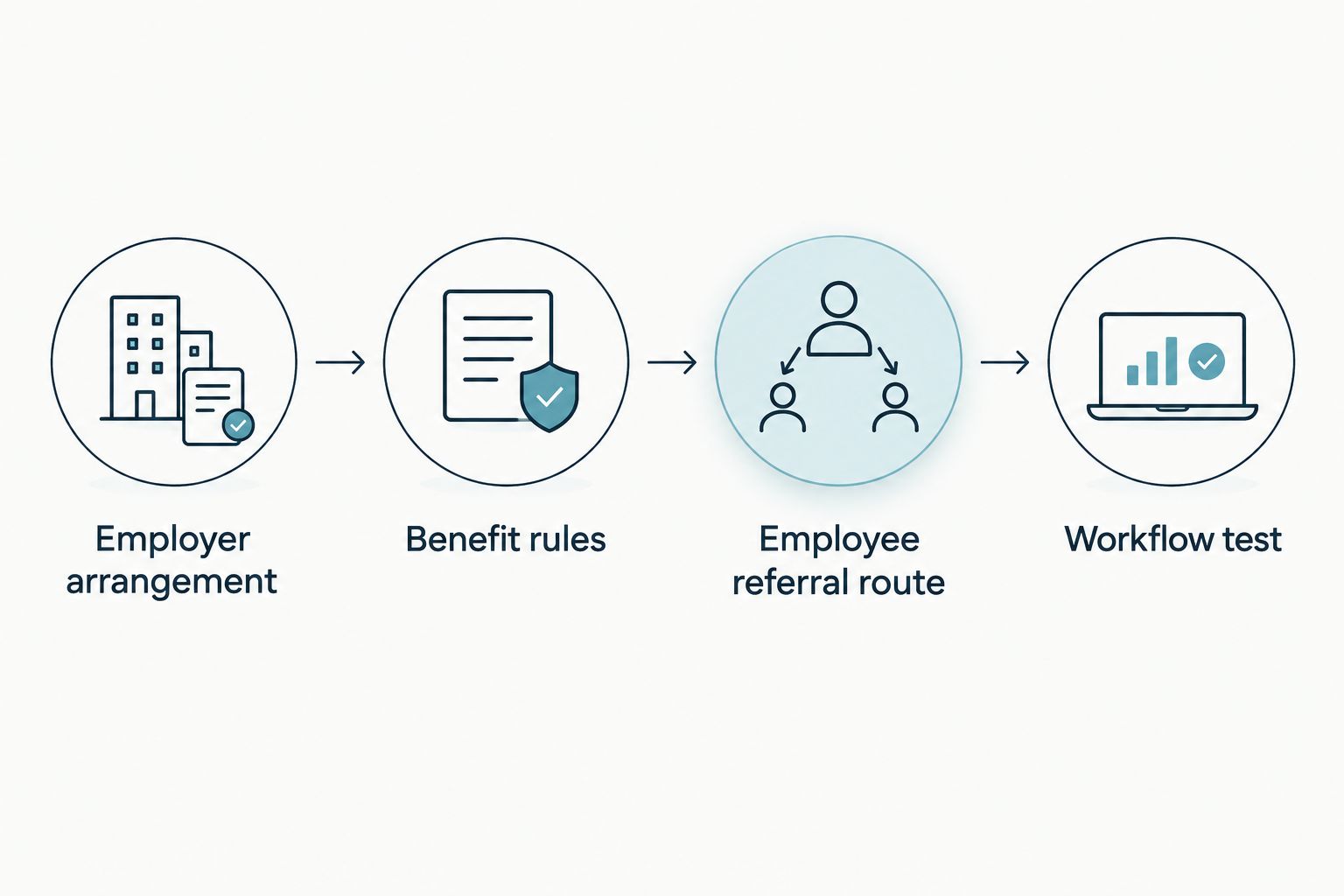
Employer arrangement
Confirm the scope before announcing the benefit
- Describe your intended arrangement. Explain that you want employees to access online therapy and state whether you are exploring employer funding or simply sharing a referral resource. Do not present either arrangement as agreed.
- Ask how employer participation works. Confirm whether the provider supports your proposed payment, referral and administration process. Ask what employees must do themselves and what HR must handle.
- Check geographic and clinical suitability. Describe where employees will attend sessions, including remote staff outside their usual country. Ask how the provider determines whether a therapist can appropriately support each employee.
- Request written administrative instructions. Confirm the contact route, responsibilities, employee-facing steps and any agreed restrictions. Record the date and owner of the agreement in your 2026 benefits document.
Ask about confidentiality and its limits in plain language. Employees need to understand both the provider's privacy practices and the circumstances in which information disclosure is required. Do not promise absolute secrecy on another organization's behalf.
Expected result: You have a confirmed route for employees and a clear description of the employer's role. If an employer-funded arrangement is not agreed, describe the service as a referral resource, not a funded employee benefit.
Choose session formats without deciding for employees
InnerSpark Africa offers the following online therapy formats. Let employees discuss format suitability with the therapist rather than asking managers to choose on their behalf.
| Format | Best for | Practical advantage | Limitation to discuss |
|---|---|---|---|
| Video | Employees who prefer visual conversation | Supports face-to-face interaction at a distance | Requires camera comfort, a suitable connection and a private setting |
| Voice | Employees who prefer speaking without a camera | Removes the need to appear on screen | Requires somewhere the conversation cannot be overheard |
| Chat | Employees who prefer written communication | Lets employees express concerns in writing | Written communication does not include vocal or visual cues |
Do not describe chat as anonymous, instant or continuously monitored unless the provider confirms those terms. A session format does not establish response times or emergency support.
Benefit rules and privacy boundaries
Write the administrative policy
- Define eligibility. State which employees the policy covers and when eligibility begins or ends. Keep eligibility separate from symptoms: managers should not decide who deserves therapy based on a personal disclosure.
- Define the employer contribution. If funding is agreed, document its scope and approval route without asking employees to disclose a diagnosis. If funding is not agreed, remove language suggesting reimbursement or direct employer payment.
- Separate records. Keep benefit administration out of performance reviews and general manager notes. Ask your privacy or legal adviser which records are necessary, who can access them and how long they should be retained.
- Set an exception route. Tell employees whom to contact about an administrative problem without requiring them to describe their therapy. Assign a backup so access questions do not depend on one person's presence.
Use 3 checks before approving a form: Is this information necessary? Who needs to see it? Can the same task be completed with less sensitive information? These are design checks, not a substitute for jurisdiction-specific advice.
For a 2026 policy, document how employees receive privacy information before submitting personal details. Avoid collecting clinical information just because your existing benefits form has an empty field for it.
Expected result: Employees can understand eligibility and payment responsibilities without revealing why they want therapy. HR can administer the arrangement without becoming part of the clinical conversation.
Employee referral route
Publish instructions that work without a manager
- Create a short benefits entry. Explain what the service offers, who your internal policy covers and whether employer funding has been agreed. Put the provider route next to the eligibility explanation.
- Separate administrative and clinical questions. Direct policy questions to the designated HR contact. Direct questions about therapy suitability, format and care to the provider.
- Explain workplace privacy choices. Encourage employees to consider their surroundings, shared devices, calendar visibility and notification previews before attending a session. Do not require a work email address unless the agreed process genuinely needs one.
- State the urgent-help boundary. Tell employees not to wait for a routine therapy appointment when there is immediate danger. Direct them to local emergency services or the nearest emergency department, and verify location-specific instructions before publication.
Your employee notice should answer practical questions without becoming a clinical intake form. Include where to start, what the employer covers under the confirmed policy, and whom to contact if the referral route fails.
A manager briefing should be narrower. Managers can share the resource and discuss practical arrangements for time away from work; they should not request a therapy summary or pressure employees to disclose what happened in a session.
Expected result: An employee can find the benefit and understand the next action without asking a line manager for permission to discuss a mental health concern.
Workflow test and launch
Check the handoff before publishing
- Run a document walkthrough. Ask a colleague unfamiliar with the policy to locate the benefit, explain eligibility and identify the correct contact. Use a fictional administrative scenario, not a real employee's health information.
- Check the provider handoff. Confirm that the published route matches the provider's instructions. Do not create fake clinical bookings or submit invented patient information to test access.
- Inspect information exposure. Check whether shared calendars, reimbursement attachments or internal messages reveal more than the administrative task requires. Correct unnecessary disclosures before launch.
- Assign a review point. Put a review date in your 2026 benefits calendar and name the policy owner. Review sooner if the provider arrangement or your internal policy changes.
Expected result: The employee route is understandable, the administrative responsibilities are assigned, and unnecessary health information does not enter HR systems.
When employee eligibility changes
A second workflow belongs alongside the initial rollout: update access instructions when an employee joins, changes employment status or leaves. This is an administrative change, not a reason to request therapy records.
- Onboarding: Share the benefit at the point your policy says eligibility begins. Avoid requiring new starters to declare whether they intend to use it.
- Status changes: Check how the agreed arrangement handles changes in eligibility. Tell employees about relevant administrative changes without asking about treatment.
- Offboarding: Explain the end of any employer contribution according to the policy. Direct questions about continuing care to the provider rather than promising uninterrupted treatment.
Before your 2026 rollout, decide who updates the benefits document and who communicates a change. Do not assume an HR system automatically updates the provider: use only a data-sharing process that both parties have explicitly agreed.
Troubleshooting
Employees cannot tell whether therapy is covered
Replace broad wording such as employee wellbeing support with the actual policy scope. State whether your organization funds access or only shares a referral resource, then identify the administrative contact.
HR receives personal disclosures in booking requests
Remove open-ended questions about why the employee wants therapy. Ask only what the administrative task requires, and direct clinical concerns to the provider. Follow your organization's approved procedure for sensitive information already received.
A manager asks whether an employee attended
Do not improvise a reporting arrangement. Refer the request to the policy owner and apply the agreed privacy rules; do not make attendance confirmation a routine manager requirement.
An employee cannot attend privately at work
Discuss practical alternatives without asking for a diagnosis. A different location or scheduling arrangement can address privacy, while the employee and therapist decide whether voice or chat suits the clinical conversation.
A request involves immediate danger
Do not place the employee in a routine benefits queue. Follow your workplace emergency procedure and direct the person to appropriate local emergency help; routine online therapy is not an emergency response plan.
Customize your workflow
After the basic handoff works, adapt the instructions for remote staff, shift workers and employees using shared devices. The online therapy guide for remote and tech workers in Africa provides a related starting point for remote-work considerations.
Keep the clinical boundary unchanged as you expand access. A team-specific version should clarify practical arrangements, not create extra questions about symptoms, diagnoses or treatment.
For your 2026 review, assess whether employees can find and understand the instructions. If considering provider reporting, first agree what information is appropriate and whether small groups create identification risks; do not assume aggregated reporting is automatically anonymous.
FAQ
How do I connect HR team to InnerSpark employee therapy?
Start by confirming an employer arrangement with InnerSpark Africa, then document eligibility, payment responsibilities and the employee referral route. Treat this as an administrative workflow rather than assuming a software integration exists.
Do we need an HR dashboard to offer online therapy?
An HR dashboard is not a prerequisite for documenting a referral workflow. Confirm the provider's actual administration process before making a dashboard or automated connection part of your plan.
Can employees choose video, voice or chat therapy?
InnerSpark Africa offers online therapy by video, voice or chat. Employees should discuss the appropriate format and practical arrangements directly with the provider.
Should HR ask employees why they want therapy?
Do not make a personal explanation part of routine benefits administration. Separate eligibility questions from clinical discussions, and have your privacy adviser review necessary records.
Can managers receive therapy notes?
Do not build manager access to therapy notes into the benefits workflow. Confirm confidentiality rules, legal requirements and any permitted disclosures with the provider and your privacy adviser.
Can we launch employer-funded therapy immediately?
Confirm the employer arrangement before announcing funded access. Agree eligibility, payment responsibilities and employee instructions first; individual therapy access does not establish a corporate benefit agreement.
What should an employee do during a mental health emergency?
An employee facing immediate danger should seek local emergency help rather than wait for a routine therapy appointment. Publish verified emergency instructions for the locations where your employees work.
One last thing
Test the calendar invitation, not just the referral link. A clear booking route still leaves a privacy problem if a shared work calendar displays a therapy appointment. Encourage employees to review calendar visibility and notification previews without asking them to show HR their personal booking details.